 how-to
Pay Electricity Bills Online: A Step-by-Step Guide
Last Updated: November 2, 2026
Quick Summary
To pay electricity bills online in Sierra Leone, open a mobile money wallet or bank app, choose the electricity bill or meter recharge option, select your provider, and enter your meter number or customer account number. Confirm the amount in SLE and authorize the payment, then save your token or receipt as confirmation.
- Gather your meter number, account number, provider name, amount in SLE and a funded wallet before you start.
- Prepaid meters need units bought in advance and loaded as a token; postpaid meters settle a monthly bill.
- Enter the meter number slowly and check it against the meter, since one wrong digit sends units elsewhere.
- A pending status means the payment is still processing, so check it before paying again.
- Keep the token SMS, receipt and reference number together for at least a month in case of disputes.
Table of Contents
- What You Need Before You Pay an Electricity Bill Online
- Prepaid or Postpaid: Choosing Your Electricity Payment Type
- How to Buy Electricity Units Online
- Prepaid Electricity Meter Recharge Online: Loading Your Token
- Paying a Postpaid Bill Through a Wallet or Bank App
- Electricity Payment Confirmation: Checking That It Went Through
- Failed Electricity Payment Troubleshooting
- Paying Your First Electricity Bill in the Ezipay SL App
- Frequently Asked Questions
What You Need Before You Pay an Electricity Bill Online
Knowing how to pay electricity bills online in Sierra Leone takes minutes once your details are correct. The real delay comes from missing information, not the app. A common pattern is that people download a wallet, tap "pay bill," then stop because they cannot find their meter number. Gather these items first and the payment flows smoothly.
Customer and Meter Details to Have Ready
Have these ready before you open any payment app:
- Meter number for prepaid customers, printed on the meter face
- Customer account number for postpaid customers, shown on your monthly bill
- Service area or provider name, so the payment reaches the right utility
A common mistake is copying the meter number from an old receipt. Meters get replaced. Check the number on the meter itself, not on last year's slip.
Prepaid or Postpaid: Choosing Your Electricity Payment Type
Prepaid and postpaid are two different payment paths, and mixing them up is the fastest way to lose money to a failed transaction. Prepaid electricity means you buy units in advance and load a token onto your meter. Postpaid electricity means you settle a monthly bill after you have used power.
Which one applies to you depends on your meter, not your preference:
- Prepaid meter: you buy units whenever credit runs low
- Postpaid meter: you receive a monthly bill and pay it by the due date
Check your meter or your most recent bill if you are unsure. Your provider assigns the type, and it does not change because you prefer one over the other.
How to Buy Electricity Units Online
Buying units online follows a fixed sequence, and each step matters. Skipping one usually means the payment goes through but the meter stays dark. What most guides leave out is which channel to use and what each one costs you in time and fees.
The Online Payment Channels Available
Electricity payments in Sierra Leone move through four practical channels. Each has a different fee profile and speed:
- Mobile money wallets, the most common route. You dial the provider's USSD short code or open the wallet app, choose bill payment, select electricity, and enter your meter number. Funds leave your wallet immediately and the token usually arrives by SMS within a minute or two.
- Bank mobile apps, if your bank app has a bill payment or utility section, you can pay from your bank balance. Processing is usually instant during banking hours but can queue overnight if you pay after close.
Fees, Limits, and Timing
Fees vary by provider and by whether you are sending from a wallet or a bank account, and pricing depends on the transaction.
Timing can vary. Prepaid tokens can lag during network congestion or after a provider's cut-off time, and postpaid payments made late may take longer to reflect on your account. If you are paying close to a disconnection deadline, allow extra time.
Step-by-Step Purchase
- Open your payment app or bank app
- Choose the electricity bill or meter recharge option
- Select your provider and service area
- Enter your meter number
- Type the amount you want to spend in SLE
- Confirm and authorize the payment
- Receive your token by SMS and load it
Watch out: if the app shows a fee before you confirm, read it, a small top-up can carry a proportionally large fee, so buying slightly larger amounts less often is often cheaper than many tiny purchases.
Entering Your Meter Number and Payment Amount
The meter number is the single most important field. One wrong digit sends units to someone else's meter, and reversing that takes a support request. Enter the number slowly, then read it back against the meter before you confirm.
For the amount, buy what you need rather than a round figure out of habit. Small, frequent top-ups suit households watching their budget. Larger purchases suit businesses that use steady power.
Prepaid Electricity Meter Recharge Online: Loading Your Token
A prepaid electricity meter recharge online ends with a token, and the token is what actually delivers the units. The payment alone does nothing until that code reaches your meter.
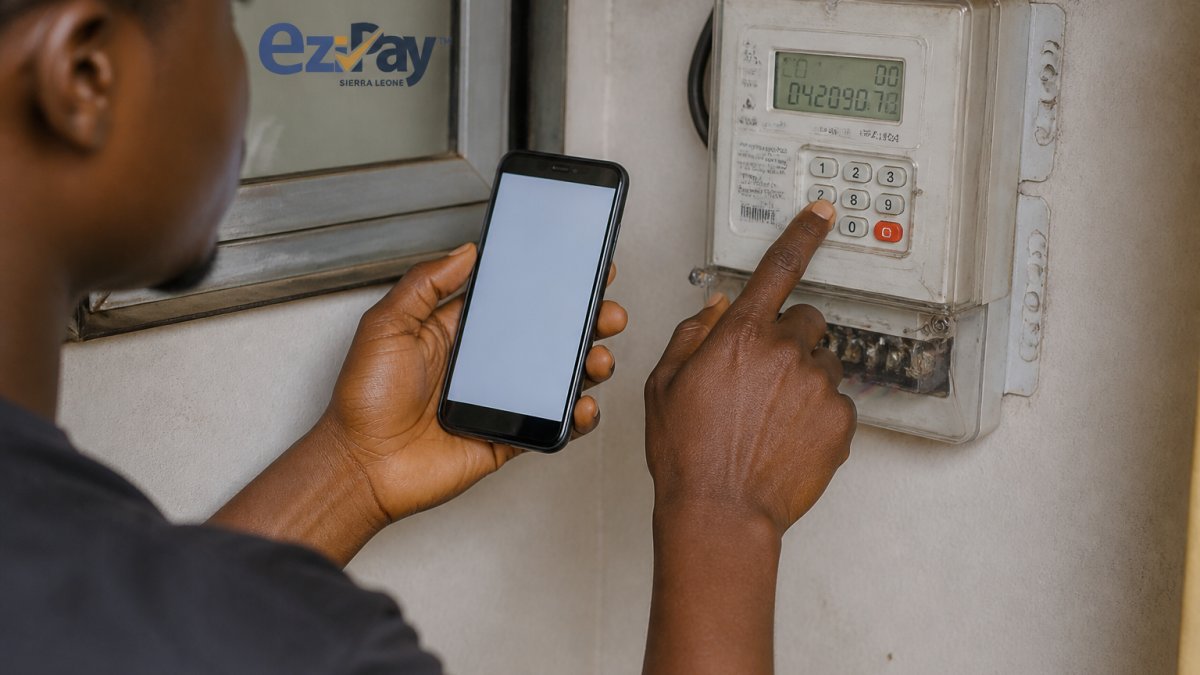
Here is the part most guides skip: the token arrives as a long string of digits, and it is easy to mistype. Write it down before you enter it. Then:
- Type the token into the meter keypad exactly as shown
- Wait for the meter to confirm before pressing anything else
- Check the meter credit display to confirm the units landed
If the Meter Rejects the Token
A rejected token is usually one of three things: a typing error, a token meant for a different meter, or a token that has already been used. Do not keep retrying the same code without checking it first. Instead:
- Re-read the SMS and re-enter the token digit by digit
- Confirm the meter number on the SMS matches the meter you are standing at
- If it still fails, note the transaction reference and the error shown on the meter, then contact your provider's support line
Debited but No Token
This is the most stressful failure: money left your wallet but no SMS arrived. Before you pay again, check the transaction status in your wallet or bank app.
Watch out: never share your token, PIN, or one-time code with anyone who calls claiming to be from the utility or your wallet provider. Genuine support will ask for your transaction reference, not your token.
Duplicate Payments and Refunds
A duplicate payment happens when you tap "pay" twice because the first screen seemed stuck. The second debit is usually reversed automatically once the provider reconciles, but the timing varies, often within a few working days, sometimes longer. Keep the receipt for both transactions and raise a support ticket with both reference numbers. Do not spend the expected refund before it lands, and do not assume a reversal will be instant.
Keeping Records
Save the token SMS, the payment receipt, and the transaction reference together, a screenshot of the SMS plus the app receipt is enough. These are the first things support will ask for, and having them ready turns a frustrating call into a two-minute fix.
Paying a Postpaid Bill Through a Wallet or Bank App
When you pay electricity bills online, postpaid payments are simpler than prepaid because there is no token to load.
Open your wallet or bank app, select bill payment, choose your electricity provider, and enter your customer account number. The app should display the outstanding balance.
If you do not yet have a wallet, you will need one before this step works. Our guide on how to register for a digital wallet in Sierra Leone walks through setup from the start.
Watch out: paying a postpaid bill to a prepaid meter number, or the reverse, is a common and costly error.
Electricity Payment Confirmation: Checking That It Went Through
Payment confirmation is the proof that your money reached the utility, and you should check it every time. Do not close the app the moment you tap "pay."
Look for three things:
- A transaction status showing completed, not pending
- A payment receipt you can save or screenshot
- A reference number for any follow-up with support
For prepaid, the token itself is your confirmation. For postpaid, check that your account balance has dropped by the amount you paid. Keep receipts for at least a month. They are the first thing support will ask for if a payment is disputed.
Failed Electricity Payment Troubleshooting
Failed payments are usually fixable, and most come down to a handful of causes. Work through them in order before you assume the worst.
| Problem | Likely Cause | What to Do |
|---|---|---|
| Payment stuck on pending | Slow network or provider delay | Wait, then check transaction status |
| Meter rejected the token | Typing error or wrong meter | Re-enter carefully, then contact support |
| Wrong amount deducted | Duplicate tap on "pay" | Check receipt, raise a support ticket |
| Payment went to wrong meter | Wrong meter number entered | Contact support with the reference |
| Insufficient balance | Wallet not funded | Top up and retry once |
Two rules save a lot of grief. Never resend a payment until you have checked whether the first one went through. And never share your PIN or token with anyone who calls you claiming to be from the utility.
If a payment fails, the money normally returns to your wallet after the provider reverses it. Timing varies, so keep the reference number and follow up rather than paying twice.
Paying Your First Electricity Bill in the Ezipay SL App
Ezipay SL is a licensed digital financial service provider offering a digital wallet for money transfers, bill payments and airtime, so you do not need separate apps for these tasks.
Here is how a first electricity payment works in Ezipay SL:
- Download the app and complete registration
- Fund your wallet through mobile money or a linked bank account
- Select bill payment and choose electricity
- Enter your meter or customer account number
- Confirm the amount and authorize
- Save your receipt or token
The app supports multiple payment options, including mobile money, bank cards, and QR codes, and includes fraud protection and continuous monitoring. In-app support is available 24/7.
For a fuller walkthrough of the bill payment flow, see our guide on how to pay electricity bills in Freetown. And if you are still deciding which wallet to use, our roundup of the best mobile money app for 2026 explains what to look for.
Frequently Asked Questions
What details do I need to pay an electricity bill online?
You need your electricity provider's name, your meter number for a prepaid meter or your customer account number for a postpaid bill, and the amount you want to pay. Have your registered mobile phone number ready too, because the token or confirmation goes there. Check the meter or account number against your last receipt before you start, since one wrong digit sends the payment to someone else's meter and it can take time to reverse.
Can I buy prepaid electricity units online with a mobile wallet?
Yes. A digital wallet app lets you buy units and receive the token on your phone without visiting a shop. Open the bill payment section, choose your electricity provider, enter the meter number and the amount, then confirm with your wallet balance or linked card. The token arrives in the app and by message, and you key it into the meter to load the credit. Keep the confirmation until the meter shows the new balance.
What should I do if my payment is deducted but my meter is not credited?
Do not pay a second time straight away. First check the transaction status in your app and look for the token or receipt in your messages. If the payment shows as successful but no token arrived, note the transaction reference, the meter number and the amount, then contact the provider's support with those details. A failed electricity payment troubleshooting request moves faster when you can quote the reference, because support can trace the transaction and either load the units or reverse the debit.
How do I check whether my electricity payment went through?
Look for three things: a payment confirmation in the app showing the amount and a transaction reference, a token code for prepaid meters, and the new balance on the meter itself after you load the token. For postpaid accounts, the receipt should show your account number and the amount credited. If the app says pending rather than successful, wait for it to clear before trying again, and keep a screenshot of the status in case you need to raise it with support.
Paying for power should not cost you an afternoon. Ezipay SL gives you a licensed digital wallet with bill payments, airtime, and transfers in one place, backed by fraud protection and 24/7 in-app support. Download Ezipay SL and pay your next electricity bill from your phone in minutes.